Assign Work Orders to Vendors and Actually Know What Got Done
Multi-task work orders, per-task vendor assignment, recurring schedules for preventive maintenance, and side-by-side estimated vs actual cost tracking. Built for landlords who care about getting it right, not just getting it done.
Key Benefits
See how this feature helps Canadian landlords save time and stay compliant
Multi-Task Work Orders
A water heater replacement is not one job, it is "drain old unit, haul away, install new, test, file warranty." Build work orders with a parent and as many tasks as you need, each with its own status and assigned vendor.
Per-Task Vendor Assignment
Different tasks, different specialists. Assign your plumber to the rough-in, your drywaller to the patch, and your painter to the finish coat. Each vendor sees only what they need to do.
Recurring Schedules
Set up daily, day-of-month, or day-of-week patterns for HVAC inspections, fire alarm tests, snow removal, gutter cleaning, or quarterly walkthroughs. New work orders generate automatically on schedule.
Estimated vs Actual Costs
Capture estimated cost and hours per task up front. Record actuals when the job is done. See where you over- or underestimated so the next quote is sharper.
Reusable Templates
Build templates for unit turnovers, annual furnace tune-ups, or move-in inspections, with all the tasks, vendors, and estimated costs pre-filled. Spin up a fully detailed work order in seconds.
One-Click from Tenant Tickets
A maintenance request comes in, your team triages it, then converts it to a work order. The tenant's photos, description, and reply history come along so the vendor sees the full context.
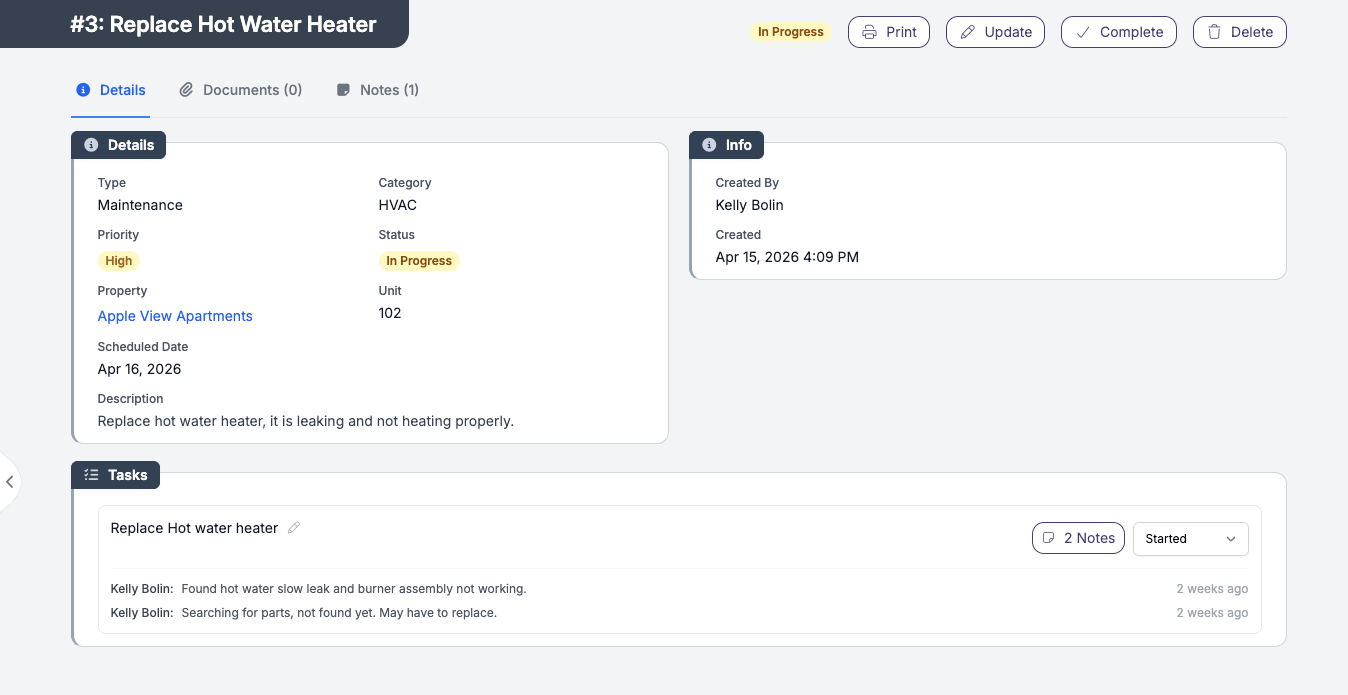
A work order with the work in it
Tasks, status, vendor notes, scheduled date - visible at a glance
From Open to Completed in Four Steps
Get started in minutes with our simple, intuitive process
Pick a Template or Start Fresh
Choose from your reusable templates (Annual Furnace Inspection, Unit Turnover, etc.) or start from scratch. Templates pre-fill tasks, vendors, and cost estimates.
Assign Tasks to Vendors
Each task gets its own assigned vendor, scheduled date, and estimated cost and hours. Add photos and notes for context. Generate a printable PDF to send the vendor by email.
Vendors Complete Tasks
As tasks get done, mark them complete and capture actual cost and hours plus a completion photo. The work order auto-updates to "Completed" once every non-cancelled task is finished.
Roll It Into Your Books
Vendor expenses tie back to the work order so you can see the true cost per repair, per property, per unit. Distribute the expense across multiple units or charge it back to the tenant if applicable.
Set It Once, Let It Run
Recurring work orders take preventive maintenance off your mental to-do list
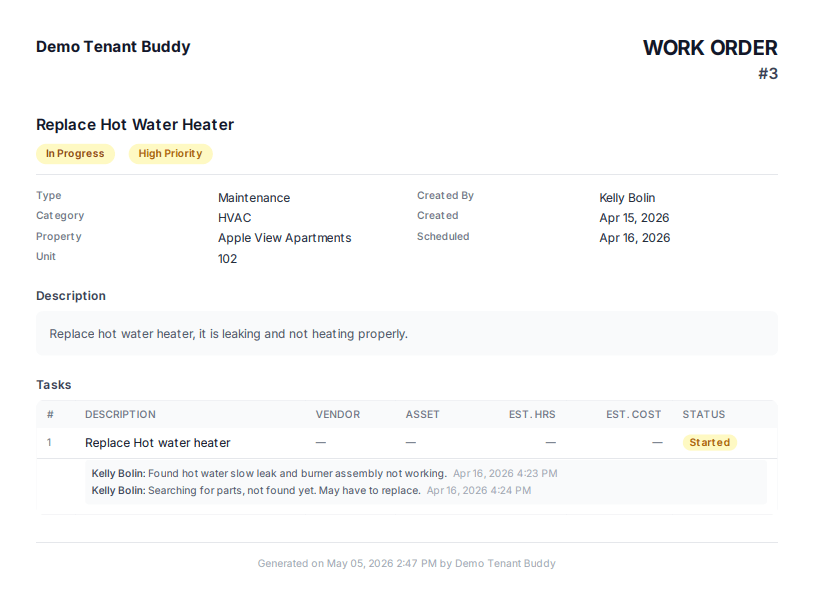
Every work order generates a printable PDF - email it directly to your vendor
HVAC Tune-Ups
Annual or bi-annual furnace and AC inspections, scheduled once and dispatched to your HVAC vendor every year.
Fire Alarm Tests
Monthly or quarterly safety inspections logged automatically with completion records you can produce on demand.
Snow Removal
Recurring winter contracts with your snow vendor. Auto-generated work orders for each scheduled visit.
Quarterly Inspections
Walkthrough checklists for each property, scheduled four times a year, assigned to a property manager or inspector.
Looking for which software handles maintenance requests and vendor payments?
Tenant Buddy combines tenant-submitted maintenance requests with vendor work order dispatch, plus expense tracking that ties vendor invoices back to the work they did. We do not directly process vendor payments, but the full audit trail is captured so payouts and reimbursements are clean.
Frequently Asked Questions
Find answers to common questions about property management software for Canadian landlords
Work Order Questions
Yes. Each task within a work order can have its own assigned vendor, scheduled date, estimated cost, and estimated hours. Useful when a job requires multiple specialists, like a renovation that needs a plumber, an electrician, and a drywaller.
Tasks within a work order are assigned to vendors. Internal team members manage and oversee work orders from the dashboard, but the on-site work itself is dispatched to the vendor you assign.
You set up a recurring pattern (daily, day-of-month, or day-of-week) on a work order. Tenant Buddy generates new work order instances on the schedule you configured. Each instance is independent so you can adjust, reassign, or cancel one without affecting future occurrences.
Yes. Each task captures both estimated and actual cost and hours. After the job is done, the variance is visible side-by-side. Useful for catching scope creep, refining future estimates, and spotting which vendors consistently come in over or under.
One click. The ticket's description, photos, and reply history transfer into the work order so the assigned vendor sees the full context. The original ticket stays linked so you can trace any work order back to the request that started it.
Yes. Each work order generates a printable PDF including the task list, scheduled date, location, vendor instructions, and any attached photos. Email it directly or download and send through your preferred channel.
Yes. If you use Asset Tracking, work order tasks can be linked to a specific asset so you have a complete maintenance history per piece of equipment. Useful for warranty claims and for deciding when to repair vs replace.
Yes. Tenant Buddy delivers multi-task work orders, recurring schedules, vendor dispatch, cost tracking, and ticket-to-work-order conversion without the long onboarding or feature-tier complexity of enterprise platforms. Pricing is transparent and per-unit so the cost matches your portfolio whether you manage 5 doors or 500.
Ready to Simplify Your Property Management?
Join Canadian landlords who ditched the spreadsheets
Start Your Free Trial