CRA-Compliant Financial Reports for Canadian Landlords
Generate professional financial reports with one click. From rent rolls to T776-ready tax reports, Tenant Buddy provides all the financial insights you need to manage your portfolio and file taxes with confidence.
Key Benefits
See how this feature helps Canadian landlords save time and stay compliant
T776-Ready Tax Reports
Generate reports organized exactly like CRA Form T776 (Statement of Real Estate Rentals). Income and expense categories match T776 line items, making tax filing fast and accurate for Canadian landlords.
Income Statements by Property
View profit and loss for each property or your entire portfolio. Track rental income, operating expenses, and net income over any time period. Compare property performance and identify your most profitable investments.
Rent Roll Reports
Comprehensive rent rolls showing all properties, units, tenants, lease dates, monthly rent, and occupancy status. Essential for loan applications, property sales, and portfolio reviews with investors or lenders.
Accounts Receivable Aging
Track outstanding rent with aging reports showing current, 30-day, 60-day, and 90+ day overdue amounts. Monitor collection rates, identify problem tenants, and maintain healthy cash flow across your portfolio.
Transaction Detail Reports
Complete transaction ledgers showing every payment, expense, invoice, and refund. Filter by property, date range, transaction type, or category. Perfect audit trail for CRA reviews and year-end accounting.
Export to PDF or Excel
Download any report as PDF for professional presentation or Excel for further analysis. Share reports with accountants, business partners, or lenders with customizable date ranges and filters.
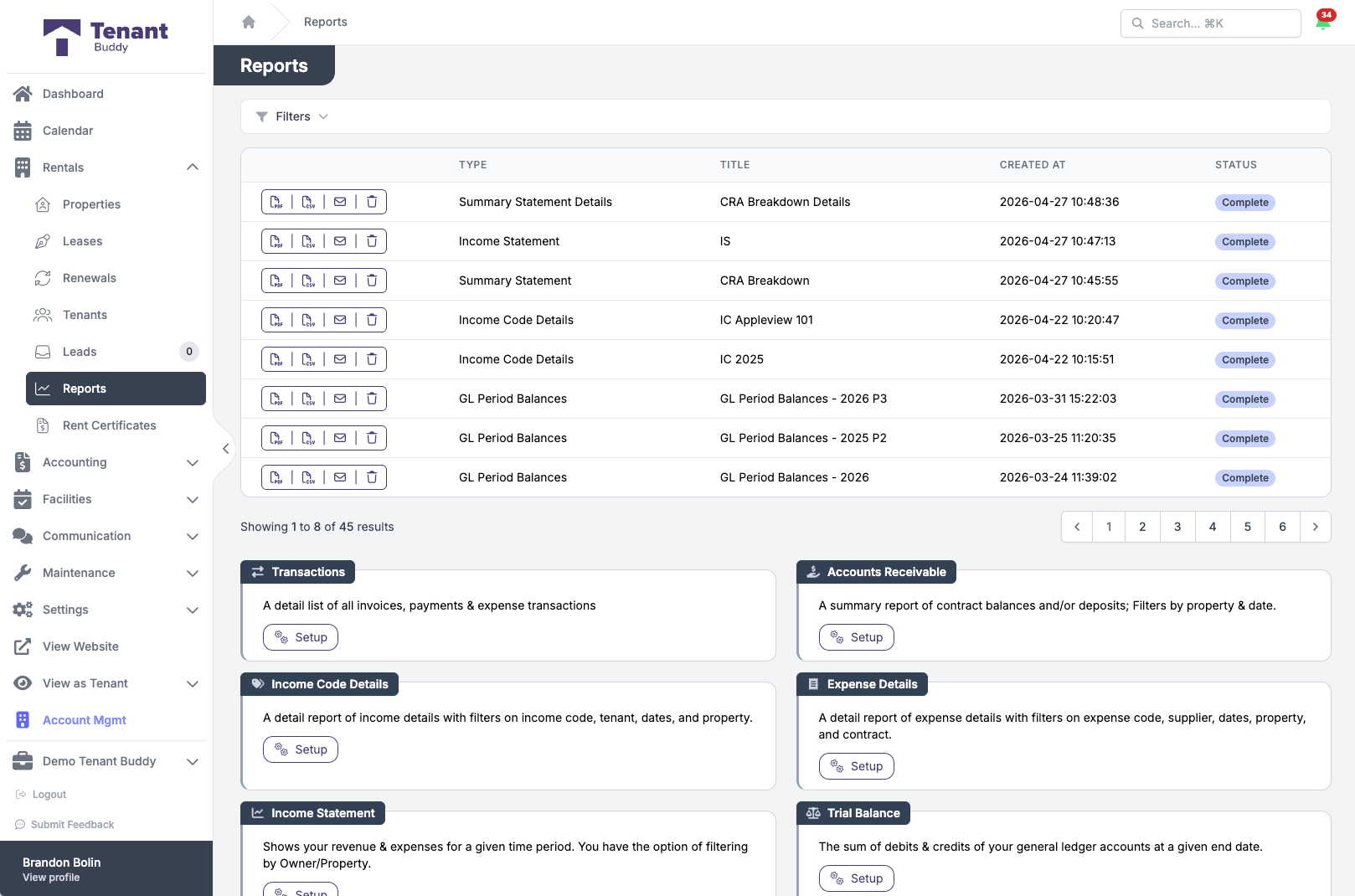
A library of CRA-ready reports
Income statements, AR aging, GL period balances, summary statements, all generated and saved with one click
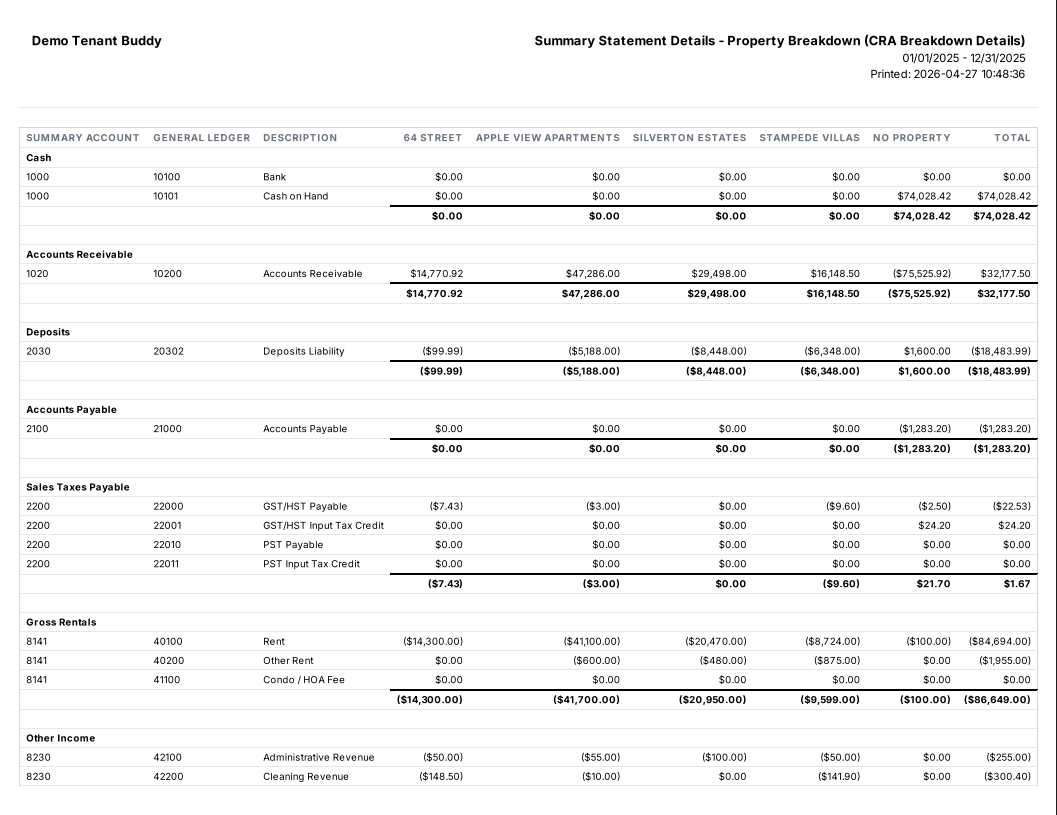
A real CRA-ready report
Property breakdown summary statement, formatted for your accountant
Generating Financial Reports
Get started in minutes with our simple, intuitive process
Select Report Type
Choose from rent rolls, income statements, T776 tax reports, transaction ledgers, AR aging, trial balance, or custom reports. Each report is designed for specific use cases like tax filing, loan applications, or portfolio analysis.
Set Filters & Date Range
Filter reports by property, unit, tenant, or transaction type. Select date ranges (month, quarter, year, or custom). Reports automatically include only the relevant transactions for your selected criteria.
Review Report Data
Preview the report on-screen before downloading. Verify totals, check categories, and ensure all expected data is included. Make adjustments to filters if needed to refine the results.
Export & Share
Download as PDF for professional presentation or Excel for further analysis. Email reports to your accountant, upload to cloud storage, or print for your records. All reports are clearly formatted and ready to use.
Essential Reports for Canadian Landlords
Every report you need to manage your portfolio and satisfy CRA requirements
Transactions Report
A detailed list of all invoices, payments, and expense transactions. Filter by date range, property, or transaction type for detailed analysis and complete audit trail.
Accounts Receivable Report
Summary report of contract balances and deposits. Track outstanding rent, identify problem tenants, and maintain healthy cash flow. Filter by property and date range.
Income Code Details Report
Detailed income breakdown with filters on income code, tenant, dates, and property. Perfect for analyzing rental income sources and tracking revenue by category.
Expense Details Report
Detailed expense breakdown with filters on expense code, supplier, dates, property, and contract. Identify cost trends and opportunities to reduce expenses across your portfolio.
Income Statement (P&L)
Shows revenue and expenses for a given time period. Compare performance across properties, track expense ratios, and analyze profitability. Filter by owner or property.
Trial Balance Report
The sum of debits and credits of your general ledger accounts at a given end date. Verify accounting accuracy and reconcile accounts before closing periods or preparing financial statements.
CRA/Summary Statement
Shows a summary of your revenue and expenses for a given time period. Organized for CRA T776 compliance, making Canadian tax filing straightforward and accurate.
CRA/Summary Statement Details
Shows the detailed accounts that make up the summary account balances. Provides line-by-line breakdown for T776 tax form preparation with CRA-compliant categorization.
Deposit Details Report
Shows the detailed breakdown of security deposits and other deposits. Track deposits received, held in trust, and returned with interest calculations where required by provincial law.
Rent Roll Report
Detailed breakdown showing all properties, units, tenants, lease terms, monthly rent amounts, move-in dates, lease expiry dates, and occupancy status. Organized by property for easy review.
Tenant Statement Report
Detailed statement of all transactions for a specific tenant. Shows rent charges, payments received, balances owed, and complete transaction history for the tenant's rental period.
Custom Report Date Ranges
All reports support custom date ranges so you can generate monthly, quarterly, annual, or year-to-date reports. This flexibility is essential for tax preparation, quarterly reviews with partners, and analyzing seasonal trends in your rental business.
Frequently Asked Questions
Find answers to common questions about property management software for Canadian landlords
Financial Reporting Questions
Tenant Buddy automatically categorizes rental income and expenses using CRA Form T776 line item codes. The T776 report shows total rental income (Line 8141), property taxes (Line 9180), insurance (Line 9200), interest on mortgages (Line 8710), repairs and maintenance (Line 9281), utilities (Line 9270), and all other required categories. This makes tax preparation much faster. Simply transfer totals from the report to your T776 form or give the report to your accountant.
Yes, all reports can be filtered by individual property, multiple selected properties, or your entire portfolio. This is useful when you need property-specific financials for loan applications, partnership accounting, or when different properties are owned by different entities (personal vs. corporate ownership).
A rent roll is a comprehensive report listing all properties, units, tenants, lease terms, and monthly rent amounts. Lenders require rent rolls when refinancing or getting mortgages on rental properties. Buyers request rent rolls when purchasing multi-unit properties. Tenant Buddy generates professional rent rolls in seconds showing current occupancy, lease expiry dates, and total monthly rental income.
Yes, all reports can be downloaded as PDF (for professional presentation) or Excel (for further analysis). Accountants often prefer Excel exports so they can import data into their tax software. You can generate year-end reports and email them directly to your accountant for T776 preparation.
AR aging reports categorize outstanding rent by how long it's been overdue: current, 1-30 days late, 31-60 days late, 61-90 days late, and 90+ days late. This helps you identify which tenants are falling behind on rent early, so you can send payment reminders, arrange payment plans, or start eviction proceedings under provincial tenancy laws before balances become uncollectible.
A trial balance shows all general ledger account balances at a specific point in time, with total debits equaling total credits. This verifies that your accounting is balanced and accurate. Trial balance reports are useful before closing accounting periods, preparing financial statements, or when your accountant is reviewing your books for tax preparation or audits.
Yes, transaction detail ledgers show every individual transaction including date, type (payment, invoice, expense), description, property, unit, tenant, amount, and running balance. This complete audit trail is essential for CRA compliance and helpful when investigating discrepancies or responding to tenant questions about their account.
Vacancy reports track which units are vacant, how long they've been vacant, and how much rental income you're losing. High vacancy rates or long vacancy periods indicate problems with pricing, marketing, property condition, or tenant screening. The report helps you identify units with turnover issues so you can address the root causes and minimize lost income.
Ready to Simplify Your Property Management?
Join Canadian landlords who ditched the spreadsheets
Start Your Free Trial