Maintenance Request Software That Cuts Response Time in Half
Tenants submit repair requests with photos from their portal. You get AI-suggested replies, SLA tracking by priority, and one-click conversion into work orders. No more lost emails, no more missed repairs.
Key Benefits
See how this feature helps Canadian landlords save time and stay compliant
Tenant Self-Submission with Photos
Tenants log into their portal, pick a category, describe the issue, and attach photos right from their phone. Each request auto-links to their unit and property so you always know exactly where the problem is.
Threaded Reply Conversations
Every back-and-forth lives inside the ticket. Tenants and staff can attach photos and files on every reply, so the full history of what was reported, what was tried, and what fixed it stays in one place.
AI-Suggested Replies
Built-in Claude-powered assistant drafts a response based on the tenant's message and your past tickets. You review, edit if needed, and send. Cuts the time-to-first-reply dramatically without losing your voice.
SLA Tracking by Priority
Configure SLA hours per priority (Low, Normal, High, Urgent). Tickets show their countdown, and overdue items are flagged so the urgent furnace failure never gets buried under non-urgent requests.
Canned Responses Library
Save the answers you find yourself typing over and over. "We've scheduled the technician for Thursday between 9 and 12." "Please run the dishwasher empty on the hottest cycle and let us know if it persists." Pick from your library, send, done.
Convert to Work Orders
When a request needs a contractor, convert the ticket to a work order with one click. Vendor, scheduled date, cost estimate, and the ticket history all flow through, so the contractor sees exactly what the tenant reported.
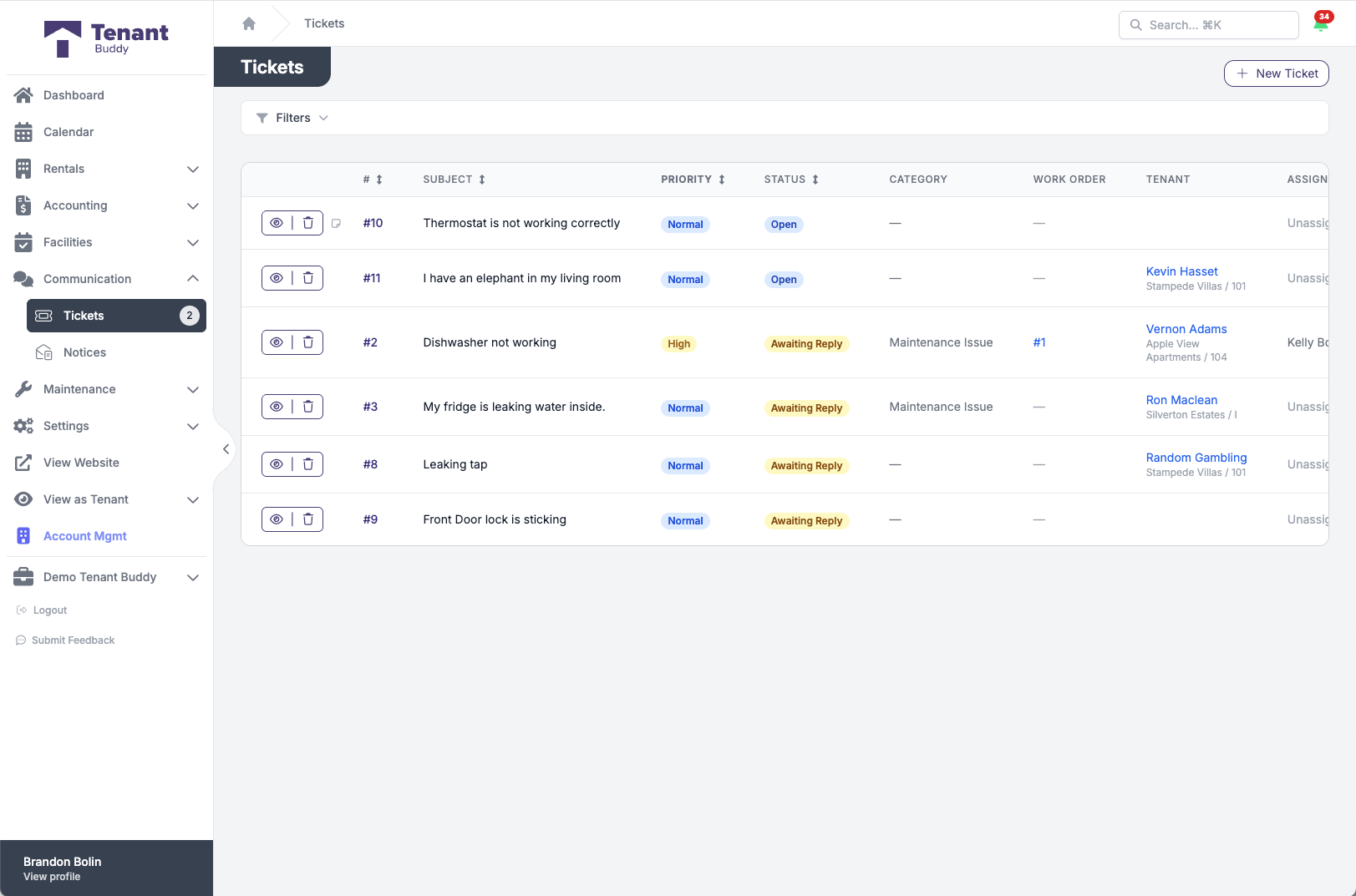
Your full ticket queue, prioritized
Status, priority, category, the linked work order, and who it's assigned to, all in one list
From Tenant Request to Resolved Issue
Get started in minutes with our simple, intuitive process
Tenant Submits Through the Portal
A tenant logs into the tenant portal, selects a category like "Plumbing" or "Appliance", describes the issue, sets a priority, and attaches photos. The ticket is auto-linked to their unit so you don't have to ask "which unit?"
AI Drafts the First Reply
Tenant Buddy reads the tenant's message and drafts a suggested reply based on context. You review, edit if needed, or replace with a canned response. Send when ready.
Assign and Track Against SLA
Assign the ticket to a team member. The SLA countdown starts based on the priority you configured. Tickets sitting too long surface clearly so nothing slips.
Resolve or Convert to a Work Order
Simple fix? Mark it resolved and the ticket auto-closes after a configurable inactivity period. Needs a contractor? Convert it to a work order with the ticket history attached and dispatch your vendor.
Built-In AI Reply Suggestions
Powered by Claude. Drafts a reply for every tenant message so you can respond in seconds, not minutes.
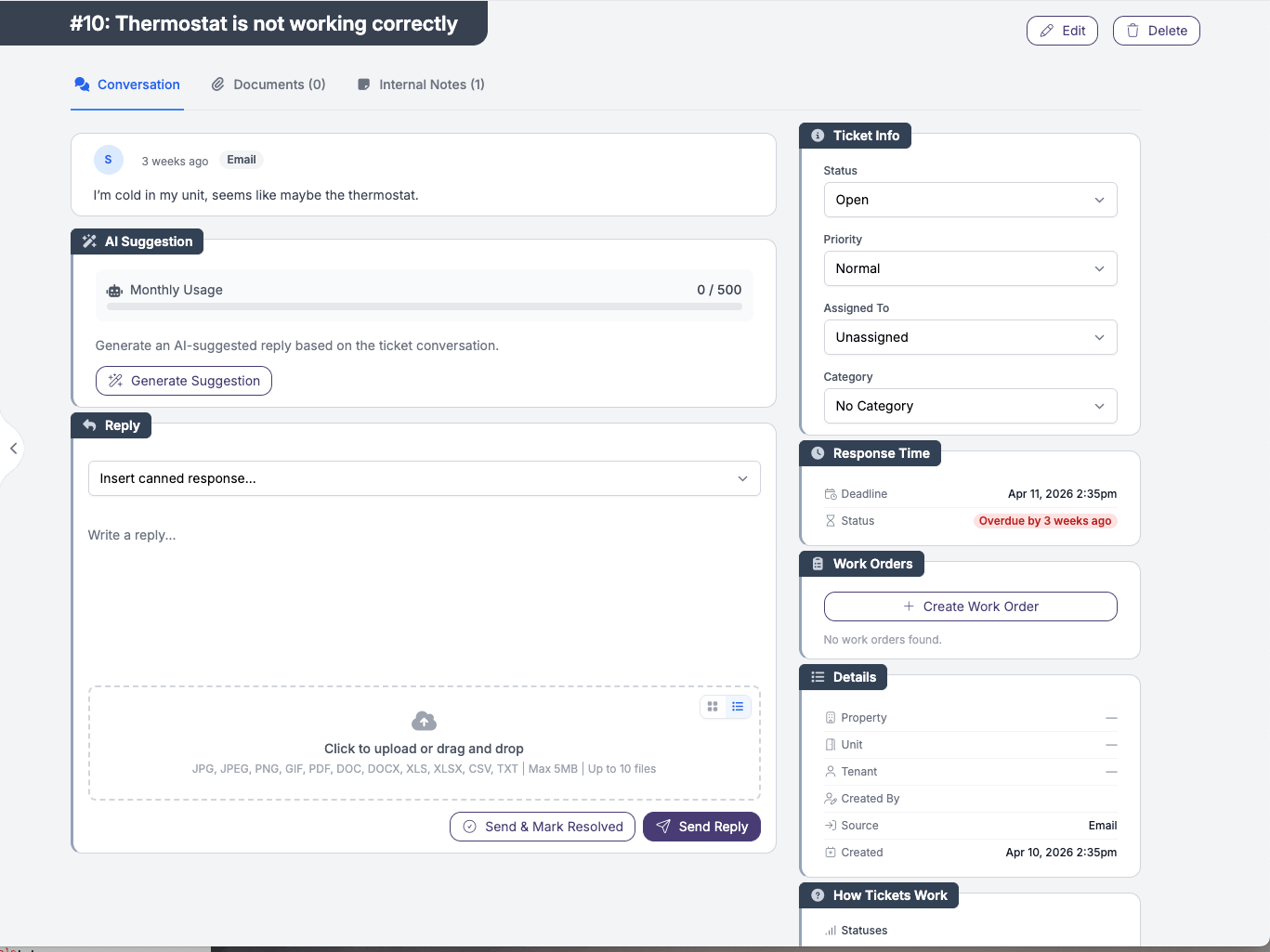
The AI Suggestion panel sits directly above the reply composer. Click, review, edit, send.
Reads the Ticket Context
The AI looks at the tenant's message, the category, and the conversation so far before drafting anything.
Suggests a Reply
A draft appears in the reply box. Helpful, in plain English, and matched to the tone you'd want to send.
You Stay in Control
Edit, reword, or scrap the draft. It is a starting point, not an autopilot. Nothing sends without you clicking send.
An alternative to enterprise maintenance platforms
Tenant Buddy delivers AI-assisted maintenance tracking, SLA monitoring, and one-click ticket-to-work-order conversion without the long onboarding or feature-tier complexity of enterprise platforms. Pricing is transparent and per-unit, so you only pay for the units you have whether that's a duplex or a 200-unit portfolio.
Frequently Asked Questions
Find answers to common questions about property management software for Canadian landlords
Maintenance Request Questions
Tenants log into their tenant portal from any device, click "New Request", pick a category, describe the issue, set a priority, and attach photos directly from their phone. Each request is automatically linked to their active unit and property, so you never have to ask "which apartment?".
Yes. Photos can be attached on the original request and on every reply. Tenants can show you the leaking pipe, the broken outlet, or the loose tile rather than trying to describe it. Your team can attach photos back too, useful for showing the completed repair.
Yes. The assigned team member gets an email notification when a tenant submits a request or replies on an existing ticket. Email routing is configurable in your support settings.
The AI is powered by Claude. When you open a ticket, you can request a suggested reply based on the tenant's message and the ticket history. The draft appears in your reply box for review. You always edit and send manually, the AI never sends on its own. The monthly suggestion quota scales with your unit count - drag the slider on the pricing page to see your exact monthly limit.
You configure SLA hours per priority level (Low, Normal, High, Urgent). Each open ticket shows its remaining SLA time, and overdue tickets are flagged visually so they surface above newer, lower-priority items. Tickets also auto-close after a configurable period of inactivity once they're resolved.
Yes. From any ticket, click "Convert to Work Order". The ticket's history (description, photos, replies) carries over so the assigned vendor sees exactly what the tenant reported. The original ticket stays linked to the work order for full traceability.
Yes. Tickets can be assigned to a specific team member, but any team member with access can view, reply, and add internal notes. Internal notes are private to staff and never shown to the tenant, so you can coordinate behind the scenes without confusing the tenant.
Yes. The canned responses library lets you save and categorize standard replies (scheduling messages, troubleshooting steps, follow-up confirmations) and insert them into a reply with one click. Pair with the AI suggestions for the fastest possible turnaround.
Ready to Simplify Your Property Management?
Join Canadian landlords who ditched the spreadsheets
Start Your Free Trial