24/7 Tenant Self-Service Portal
Reduce phone calls and emails by 80% with a secure tenant portal. Give tenants instant access to leases, invoices, payment history, and documents from any device, anytime.
Key Benefits
See how this feature helps Canadian landlords save time and stay compliant
Secure 24/7 Access
Tenants log in with email and password to access their personal portal anytime. All data is encrypted and isolated so tenants only see their own information, never other tenants' data.
Lease & Document Access
Tenants view and download their current lease, past leases, move-in inspections, property rules, and any documents you share. No more "can you send me my lease again?" requests.
Invoice & Payment History
Complete invoice history showing all current and past charges, payment dates, and remaining balances. Tenants can download invoice PDFs for their records or tax purposes.
Notification Preferences
Tenants control how they receive notifications: email, SMS, or both. Choose which notifications to receive (invoice reminders, lease expiry, maintenance updates) and when.
Contact Info Updates
Tenants update their email, phone number, emergency contacts, and other personal information directly in the portal. Changes sync automatically to your system, keeping records current.
Reduced Admin Workload
Eliminate repetitive tenant requests for invoices, lease copies, payment confirmations, and account balances. Tenants find answers themselves, freeing up your time for more important tasks.
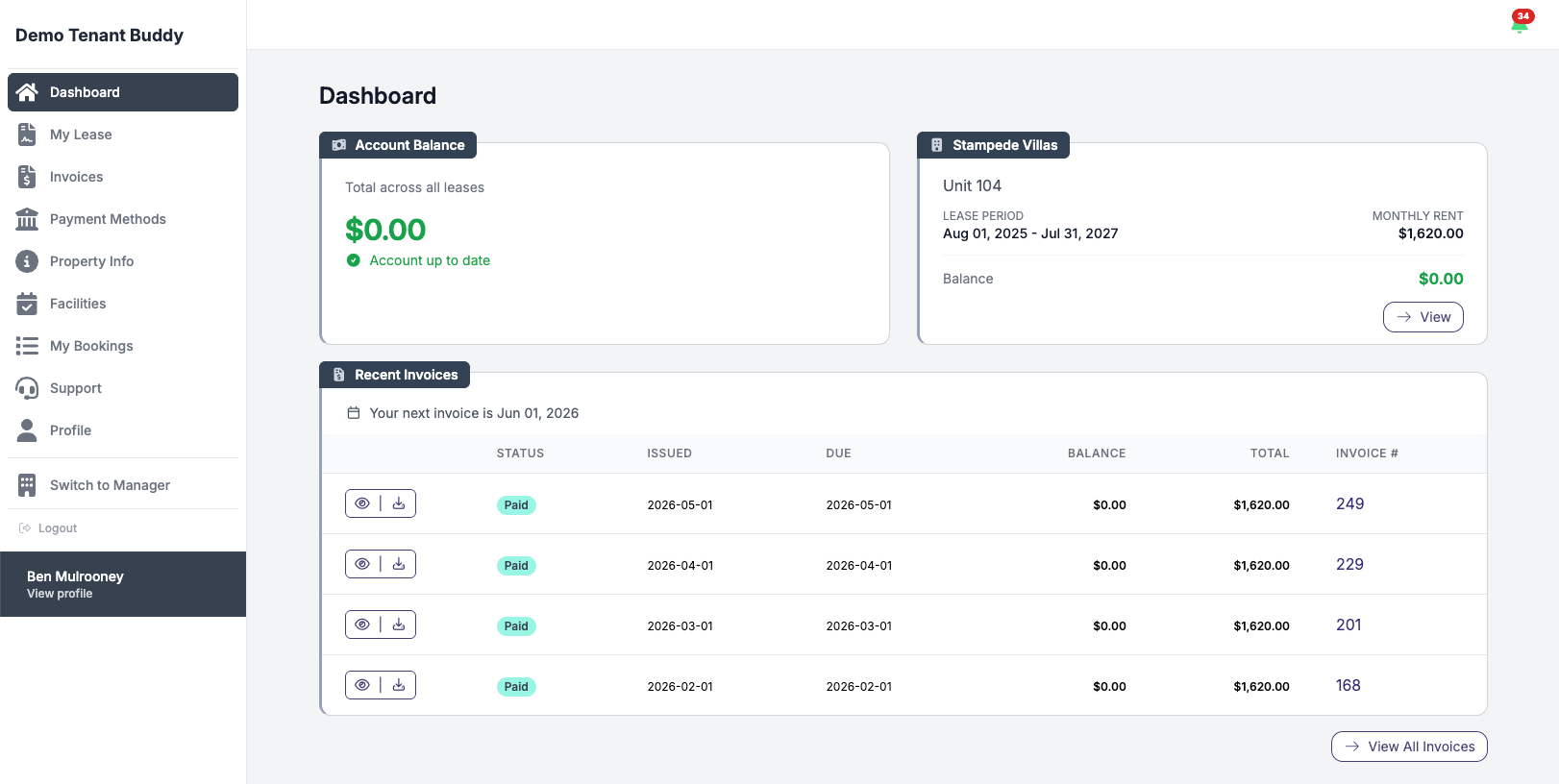
What tenants see when they log in
Account balance, lease details, recent invoices, all on one screen
Setting Up Tenant Portal Access
Get started in minutes with our simple, intuitive process
Enable Portal for Tenants
When creating a tenant or lease, enable portal access and enter the tenant's email address. Tenant Buddy automatically sends an invitation email with login instructions and a secure password setup link.
Tenants Self-Serve Information
Tenants access their portal 24/7 to view account balances, download lease copies, check payment history, update contact information, and manage notification preferences, all without contacting you.
You Save Time & Reduce Calls
Common tenant questions are answered automatically by the portal. No more emails asking for invoice copies, lease documents, or payment confirmations. Your workload decreases while tenant satisfaction increases.
What Tenants Can Access
Everything tenants need in one secure, easy-to-use portal
Current Lease Agreement
View and download their active lease with all terms, clauses, and amendments.
Invoices & Statements
All current and historical invoices with itemized charges and due dates.
Payment History
Complete record of all payments made including dates, amounts, and methods.
Current Balance
Real-time account balance showing any amounts owed or credit on account.
Shared Documents
Access property rules, move-in reports, notices, and other important documents.
Personal Information
Update email, phone, emergency contacts, and notification preferences.
Browse Amenities
View all available building amenities with descriptions, photos, hours, and pricing.
Book Amenities
Reserve amenities for specific dates and time slots, view booking status, and manage reservations.
Mobile-Friendly Design
The tenant portal works perfectly on phones, tablets, and computers. Tenants can access their information from anywhere, making it convenient for them and reducing support requests for you.
Amenity Booking System
Give tenants the ability to book building amenities 24/7 through their portal
If your building offers amenities like a gym, party room, pool, theatre, BBQ area, or guest parking, tenants can browse, view availability, and book these amenities directly through their portal. No more phone calls or email chains to reserve the party room.
Browse & Discover
Tenants see all available amenities with photos, descriptions, operating hours, capacity limits, and any associated costs. Everything they need to make a booking decision.
Real-Time Availability
Interactive calendar view shows available and booked time slots in real-time. Tenants select their desired date and see exactly which time slots are open for booking.
Flexible Time Slots
Book amenities for specific time slots (e.g., 9:00 AM - 11:00 AM) or multiple consecutive days. Perfect for extended bookings like guest parking or storage units.
Booking Management
View all current and past bookings, check booking status (pending, approved, rejected), and see booking details including any charges that will be added to their account.
Approval Workflow (Optional)
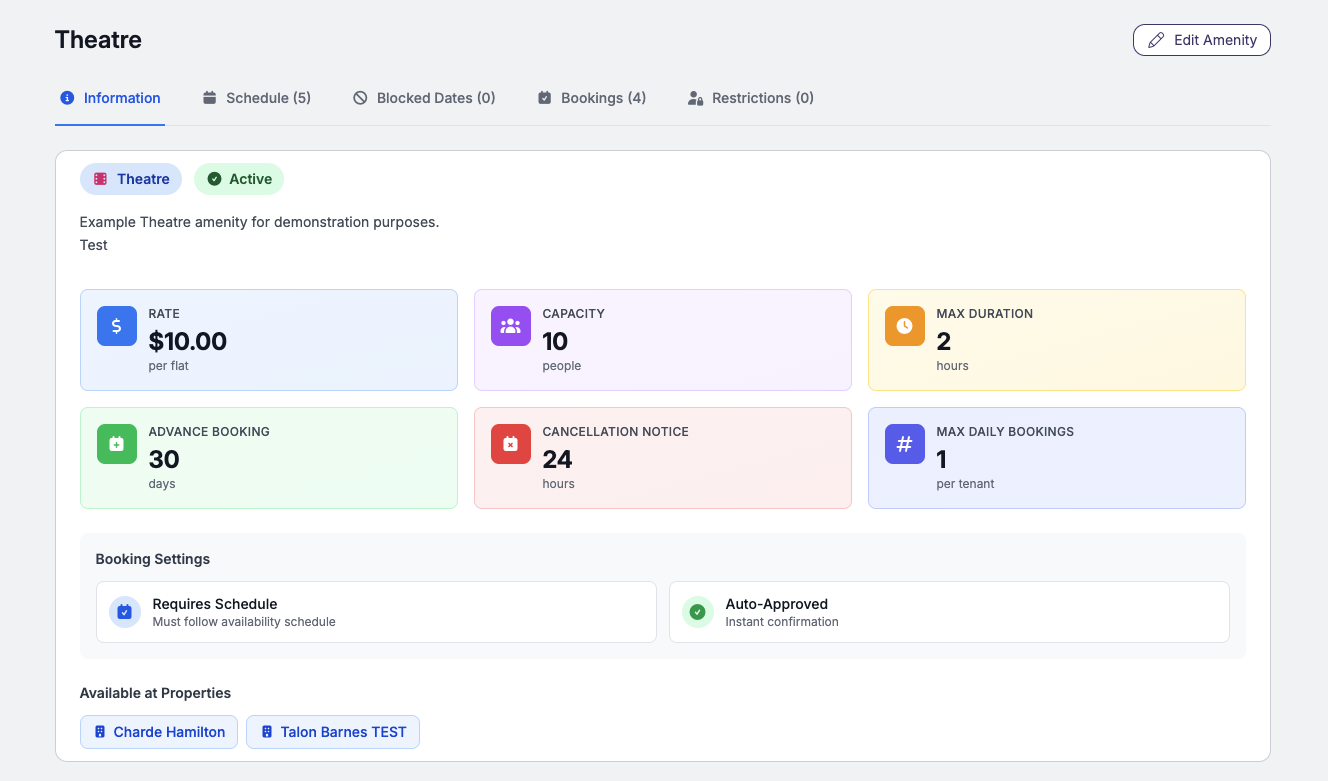
You control whether bookings are automatically approved or require your review. Set automatic approval for low-demand amenities like the gym, and require approval for high-demand amenities like the party room to prevent conflicts.
Frequently Asked Questions
Find answers to common questions about property management software for Canadian landlords
Tenant Portal Questions
When creating a new tenant or lease, simply enter the tenant's email address and enable portal access. Tenant Buddy automatically sends an invitation email with instructions to create their password and log in. The process takes less than 2 minutes for the tenant to complete.
Tenants can reset their password using the "Forgot Password" link on the login page. They receive a password reset email, click the link, and create a new password with no landlord involvement required. This eliminates "I can't log in" support requests.
Yes, you control what documents are shared with tenants. By default, tenants see their lease, invoices, and payment history. You can choose to share additional documents like property rules, move-in inspections, or notices. Tenants never see financial information from other tenants or your property-level finances.
Yes, the portal uses bank-level encryption (SSL/TLS) and requires secure password authentication. Each tenant only sees their own data, and complete isolation ensures privacy.
Absolutely. The tenant portal is fully responsive and works perfectly on iOS and Android phones, tablets, and desktop computers. Tenants can check their balance, download invoices, or update contact information from any device with an internet connection.
Most landlords see a sharp drop in tenant emails and phone calls after implementing the portal. Common requests like "send me my lease," "what's my balance," and "can I get a copy of last month's invoice" are all answered instantly by the portal, freeing up your time for the things that actually need your attention.
Tenants browse available amenities (gym, party room, pool, etc.), view availability on a calendar, and select their desired date and time slot. Bookings can be automatically approved or sent to you for review depending on your settings. Any booking fees are automatically added to a tenant invoice.
The system prevents double-bookings automatically. Once a tenant books a time slot (and it's approved), that slot becomes unavailable on the calendar for other tenants. The first approved booking wins the slot, ensuring no conflicts.
Ready to Simplify Your Property Management?
Join Canadian landlords who ditched the spreadsheets
Start Your Free Trial