Digital Lease Management for Canadian Landlords
Create professional rental agreements in minutes with custom templates. Send for electronic signatures, track lease expiry dates, and manage renewals, all compliant with provincial tenancy laws.
Key Benefits
See how this feature helps Canadian landlords save time and stay compliant
Custom Lease Templates
Create reusable lease templates with dynamic placeholders for tenant names, addresses, rent amounts, and dates. Build templates for standard leases, month-to-month, commercial, or any custom arrangement.
Electronic Signatures
Send leases for electronic signature via email. Tenants sign digitally from any device with no printing, scanning, or mailing required. All signatures are legally binding and timestamped.
Automatic Expiry Tracking
Never miss a lease renewal deadline. The system tracks lease end dates and sends automatic reminders 90, 60, and 30 days before expiry, giving you time to decide whether to renew or find new tenants.
Lease Renewals & Amendments
Renew existing leases with updated terms, rent increases, or new end dates. Create lease amendments for changes to original agreements, all stored alongside the original lease.
Provincial Compliance
Templates can be customized to comply with provincial tenancy laws including Ontario RTA, BC RTA, Alberta RTA, and others. Include required disclosures, clauses, and provincial-specific terms.
Multi-Tenant Signing
Send leases to multiple tenants on the same agreement. Each tenant signs individually, and the lease auto-approves once everyone has signed. Per-tenant signature audit trail with IP, device, and timestamp captured.
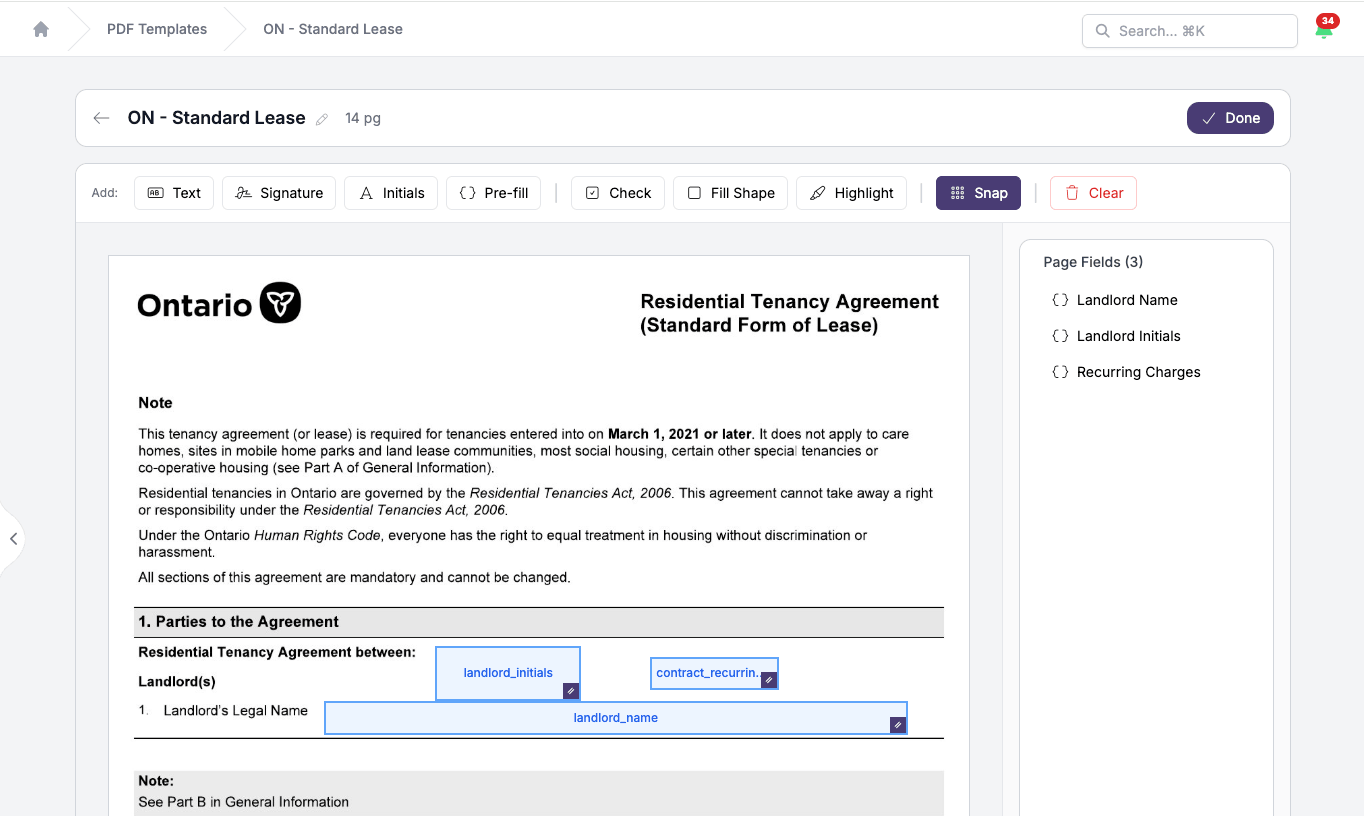
Drop merge fields onto any PDF
Use Ontario's standard lease, your own template, or any PDF. Click a field, drop it in.
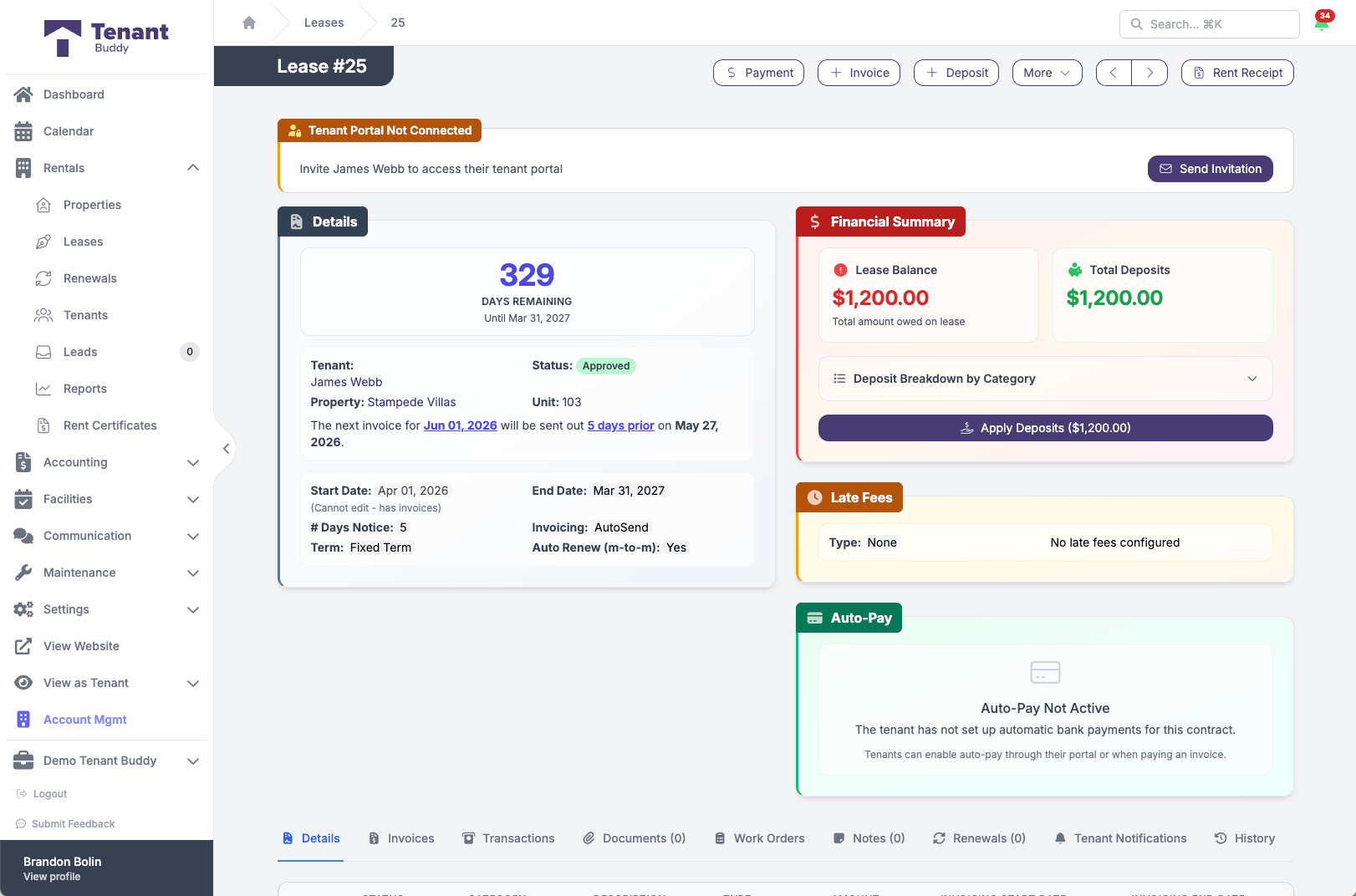
Every lease, with everything attached
Days remaining, financial summary, late fee config, auto-pay status, all in one screen
Creating Digital Leases
Get started in minutes with our simple, intuitive process
Create Lease Template
Build your standard lease template once with dynamic placeholders like {tenant_name}, {property_address}, {monthly_rent}, and {lease_start_date}. Include all standard clauses, rules, and provincial-required disclosures.
Generate Lease for Tenant
When signing a new tenant, select your template and fill in the specific details (tenant name, unit, rent amount, lease dates). Tenant Buddy automatically populates all placeholders and generates a complete, ready-to-sign lease.
Send for E-Signature
Email the lease directly to the tenant for electronic signature. They receive a link to review and sign the lease from their phone, tablet, or computer. You're notified immediately when they sign.
Manage Renewals & Expiry
Receive automatic reminders before leases expire. Create renewal leases with updated terms (rent increases, new end dates) and send for signature. Original leases and renewals stay linked for easy reference.
Dynamic Lease Placeholders
Create templates once and automatically populate tenant-specific information
Available Placeholders
{tenant_name}
Full tenant name
{property_address}
Complete property address
{unit_number}
Apartment or unit number
{monthly_rent}
Monthly rent amount
{lease_start_date}
Lease commencement date
{lease_end_date}
Lease termination date
{security_deposit}
Deposit amount
{landlord_name}
Your name or company
Provincial Standard Lease Forms
Some provinces like Ontario require use of the standard lease form for most residential tenancies. Tenant Buddy allows you to upload and use provincial standard forms as templates, or customize them where legally permitted. Always consult local tenancy laws.
Frequently Asked Questions
Find answers to common questions about property management software for Canadian landlords
Lease Management Questions
Yes, electronic signatures are legally binding in Canada under federal and provincial electronic commerce laws. Tenant Buddy's e-signature feature creates legally enforceable contracts with timestamps, IP addresses, and audit trails showing when and how documents were signed.
Some provinces like Ontario require landlords to use the provincial standard lease form for most residential tenancies. Other provinces allow custom leases as long as they comply with provincial tenancy laws. Tenant Buddy supports both. Upload your province's standard form or create custom templates that include all required provincial disclosures and clauses.
When a lease is approaching expiry, Tenant Buddy sends automatic reminders at 90, 60, and 30 days before the end date. You can create a renewal lease with updated terms (like rent increases compliant with provincial guidelines), send it for e-signature, and the system links the renewal back to the original lease for easy reference.
You can create lease amendments for changes to existing agreements (adding occupants, allowing pets, changing parking arrangements, etc.). Amendments are sent to tenants for e-signature and stored alongside the original lease so the full agreement history is in one place.
Yes, tenants can access their lease through their tenant portal 24/7. They can download PDF copies anytime, eliminating requests for lease copies and ensuring they always have access to their rental agreement.
Create lease templates for month-to-month tenancies by setting the lease type to "periodic" instead of fixed-term. In many provinces, fixed-term leases automatically convert to month-to-month when they expire unless either party gives proper notice. Tenant Buddy tracks both fixed-term and periodic leases.
Yes, add custom clauses for pet policies, parking rules, maintenance responsibilities, or any special terms. Attach schedules, property rules, condo bylaws, or other documents that become part of the lease agreement. All attachments are included when sending for e-signature.
You can generate a PDF version of the lease for printing and manual signature. Upload the signed copy back to Tenant Buddy for storage and tracking. The system tracks both electronic and manual signatures while maintaining the same lease management features like expiry tracking and renewals.
Ready to Simplify Your Property Management?
Join Canadian landlords who ditched the spreadsheets
Start Your Free Trial