Online Invoice Payments for Canadian Landlords
Tenants pay rent online via credit card or bank transfer (PAD). Automatically pay invoices and update your books instantly. Powered by Stripe.
Key Benefits
See how this feature helps Canadian landlords save time and stay compliant
Credit Card Payments
Tenants pay invoices instantly with Visa, Mastercard, and other major cards. Payments are processed securely through Stripe and applied to the invoice automatically.
Pre-Authorized Debit (PAD)
Automatic recurring bank withdrawals on the invoice date. Tenants authorize once and rent is collected directly from their bank account each month. Set it and forget it.
Auto-Pay
Rent is automatically charged each month on the invoice date. No manual action needed from landlord or tenant.
Flexible Processing Fees
Absorb fees yourself or pass a percentage, fixed amount, or both (with an optional max cap) to tenants. Tenants see a clear fee breakdown before confirming payment.
Automatic Reconciliation
Payments auto-apply to invoices, update accounts receivable, and create journal entries instantly. No manual data entry or matching required.
Secure & PCI Compliant
Powered by Stripe Connect. Card details and bank information never touch your servers. Stripe handles all sensitive payment data with full PCI compliance.
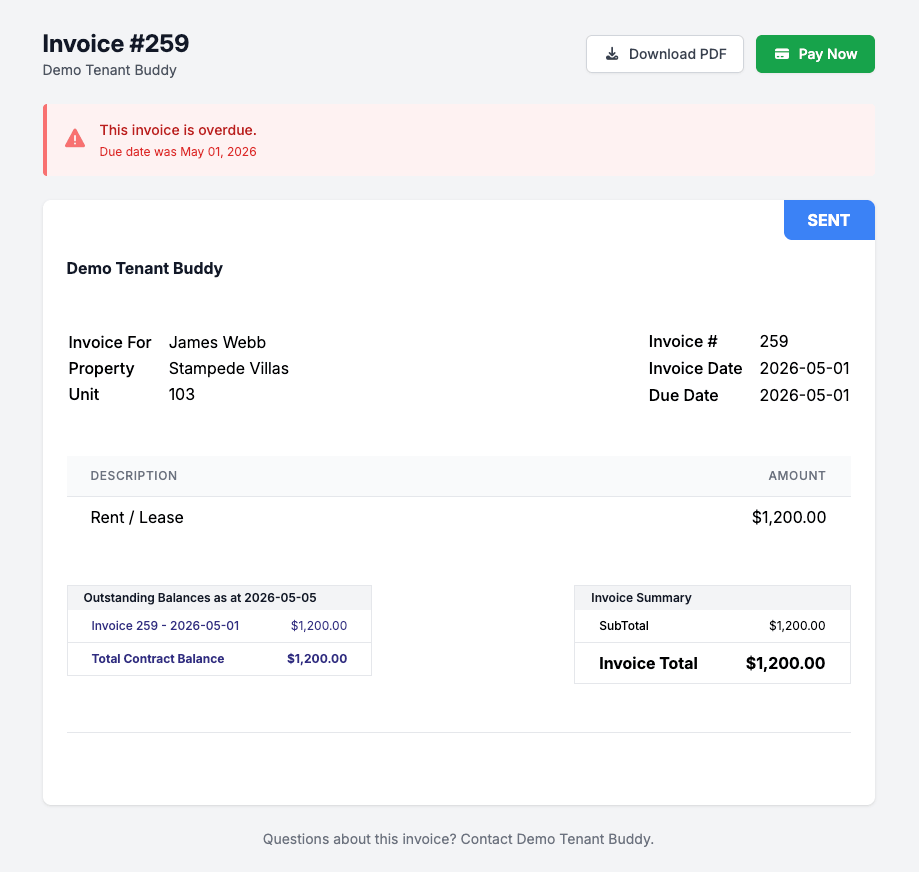
What your tenant sees
A clean invoice with one prominent button: Pay Now. No friction, no portal sign-in required.
How Online Payments Work
Get started in minutes with our simple, intuitive process
Connect Your Stripe Account
Connect your existing Stripe account or create a new one. It takes just a few minutes.
Enable Payment Methods
Toggle credit card and/or PAD payment options on or off. Configure processing fee preferences to absorb fees or pass them to tenants.
Tenants Pay Online
Tenants click "Pay Now" from the Tenant Portal or an emailed invoice link. They choose to pay by card or bank transfer.
Automatic Payments
If automatic PAD payments are enabled and setup, payments are made automatically each month for rent invoices.
Payment Methods & Fee Flexibility
Two ways for tenants to pay, with full control over processing fees
Credit Card
- Visa, Mastercard, and other major cards
- Instant payment confirmation
- Pay from portal or emailed invoice link
- Typical Stripe rate: 2.9% + $0.30
Pre-Authorized Debit (PAD)
- Direct bank account withdrawals
- Supports auto-pay / recurring payments
- Tenant authorizes once, rent collected automatically
- Lower Stripe rate: 1% + $0.30 (capped at $5)
Processing Fee Flexibility
Choose who pays the processing fees. Absorb fees yourself to keep tenant costs simple, or configure a percentage, fixed amount, or both (with an optional max cap) that gets added to the tenant's invoice total. Tenants see a clear fee breakdown before confirming payment.
Auto-Pay with PAD
Tenants authorize recurring bank withdrawals from the Tenant Portal. Once set up, rent is automatically charged on the invoice date with no manual action needed from landlord or tenant. Only the remaining balance is charged, so partial payments are handled automatically.
Frequently Asked Questions
Find answers to common questions about property management software for Canadian landlords
Online Payment Questions
Tenants can pay from the Tenant Portal by clicking "Pay Now" on any outstanding invoice, or by clicking the payment link in their invoice email. They enter their credit card or bank account details, review the total (including any processing fees), and confirm payment. The invoice is updated automatically once the payment succeeds. This is for manual payments, not Pre-Authorized PAD recurring payments.
Tenant Buddy supports credit card payments (Visa, Mastercard, and other major cards) and Pre-Authorized Debit (PAD) for direct bank account withdrawals. You can enable one or both payment methods from your Stripe settings. All payments are processed securely through Stripe.
Yes. Tenants can set up auto-pay from the Tenant Portal by authorizing a PAD (Pre-Authorized Debit) for their Tenant Dashboard. Once authorized, rent is automatically charged from their bank account on the invoice date each month. Only the remaining balance is charged, so if a partial payment was already made, auto-pay handles the rest.
That's up to you. You can absorb the processing fees yourself to keep things simple for tenants, or configure fees to be passed to tenants. Fees are added to the invoice total, and tenants see a clear breakdown of the base amount and processing fee before confirming payment.
Processing fees can be configured as a percentage, a fixed amount, or both combined. You can also set an optional maximum cap. For example, you might set 2.9% + $0.30 with no cap for credit cards, and 1% + $0.30 with a $5 cap for PAD. The fee is calculated on the invoice amount and shown to tenants before they pay.
When Stripe confirms a successful payment, Tenant Buddy automatically marks the invoice as paid, updates accounts receivable, creates the proper journal entries, and records the transaction. If processing fees were charged, they are recorded as income in a separate ledger account. No manual reconciliation needed.
Absolutely. All payments are processed through Stripe Connect, which is PCI DSS Level 1 certified, the highest level of payment security. Credit card numbers and bank account details never touch Tenant Buddy's servers. Stripe handles all sensitive payment data, and webhook communications are verified with cryptographic signatures.
Yes, you need a Stripe account to accept online payments. If you don't have one, you can create a free Stripe account during the connection process. Tenant Buddy uses Stripe, so you connect your own Stripe account and payments go directly to you.
Ready to Simplify Your Property Management?
Join Canadian landlords who ditched the spreadsheets
Start Your Free Trial