Amenity Booking & Management System
Let tenants book amenities online while you control availability, pricing, and access. Reduce conflicts, track usage, and generate revenue from property amenities, all automated.
Key Benefits
See how this feature helps Canadian landlords save time and stay compliant
Automated Booking System
Tenants book gym, pool, party room, and other amenities 24/7 from their portal. No more phone calls or email chains to reserve amenities. Choose instant confirmation or approval-based bookings.
Flexible Scheduling
Set operating hours for each day of the week. Configure time slots, or enable all-day bookings for storage units and exclusive spaces. Control maximum booking duration per amenity.
Capacity Management
Set capacity limits per amenity and track guests per booking. Control concurrent bookings per time slot to prevent overcrowding. Ensure safety and comfort for all tenants automatically.
Maintenance & Blocked Dates
Block dates for maintenance, repairs, or special events. Set up recurring blocks (weekly cleaning, monthly maintenance) or pattern-based blocking (first Tuesday each month). System prevents bookings during maintenance automatically.
Revenue Generation
Set pricing: Free, hourly, daily, or flat fee per booking. Automatic fee calculation appears on tenant invoices. Track amenity revenue separately. Encourage use of premium amenities while generating income.
Tenant Restrictions
Restrict specific tenants from booking certain amenities after violations or damages. Track reasons for each restriction. Maintain amenity rules and policies automatically. Protect your property assets.
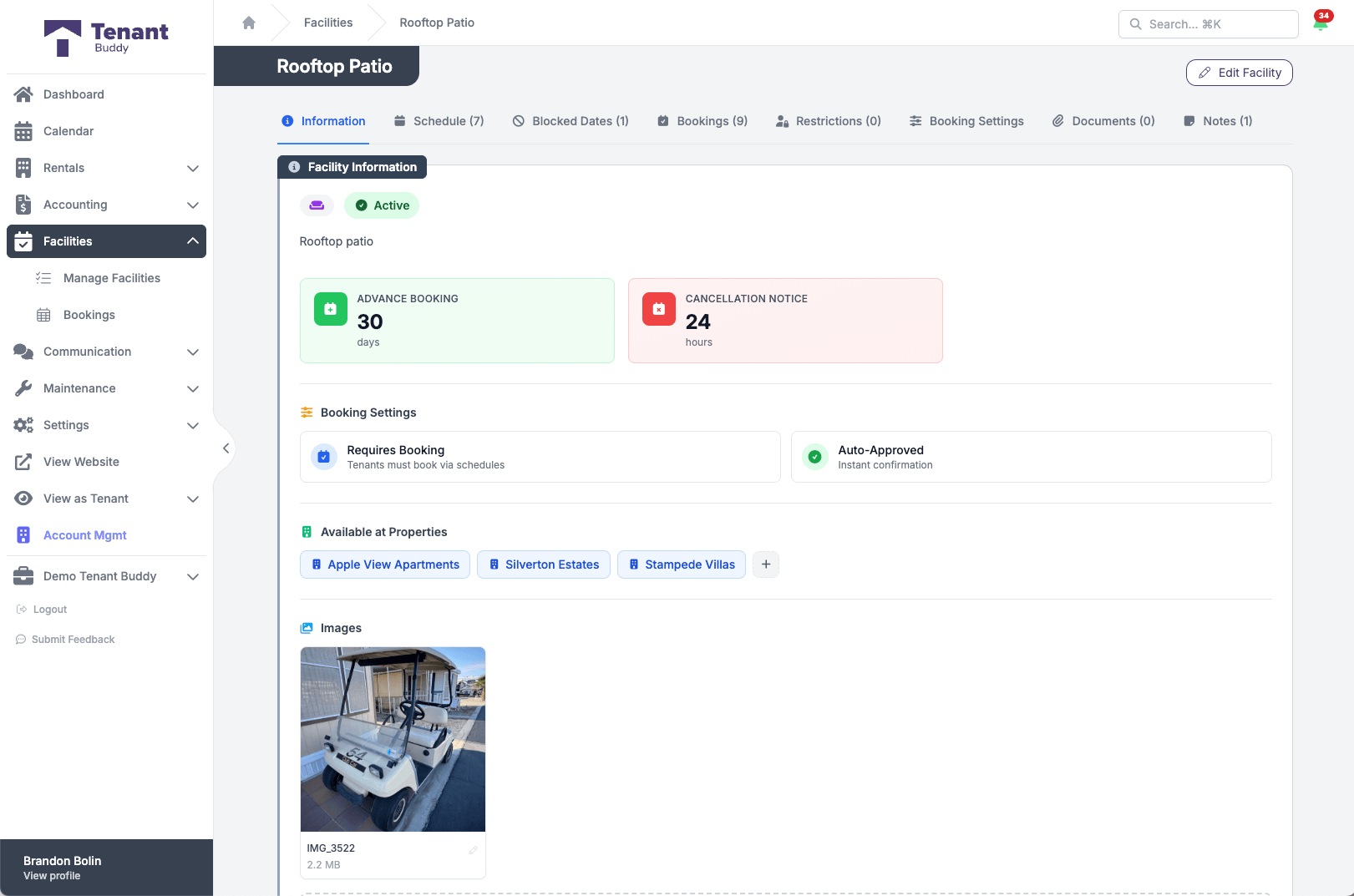
Each facility, fully configured
Schedule, blocked dates, advance booking windows, cancellation rules, and which properties have access
How Amenity Bookings Work
Get started in minutes with our simple, intuitive process
Create Amenities
Add amenities like gym, pool, party room, or storage with photos, descriptions, capacity limits, and pricing. Set whether bookings require your approval or are confirmed instantly.
Configure Schedules & Rules
Set operating hours for each day of the week, time slot durations, capacity per time slot, and booking limits. Add blocked dates for maintenance or special events.
Tenants Book Online
Tenants browse available amenities from their portal, view real-time availability, select dates/times, add guests, and book instantly (or request approval). They see pricing and rules before booking.
Automatic Conflict Prevention
The system automatically prevents double-bookings, enforces capacity limits, respects blocked dates, checks tenant restrictions, and validates booking rules. You stay in control without manual work.
Track Usage & Revenue
View booking history, usage patterns per amenity, revenue generated, most popular times, and tenant booking trends. All fees automatically appear on tenant invoices with no manual billing required.
Example Amenity Management
Create any type of bookable amenity for your property
Swimming Pool / Hot Tub
Manage pool hours, capacity limits, and maintenance days.
Party Room / Event Space
Enable full-day or half-day bookings, set fees, require approval, track guest counts.
Guest Parking Spaces
Manage visitor parking with time limits, fees, and restrictions.
Custom Amenity Types
Create any amenity type specific to your property with flexible settings.
Frequently Asked Questions
Find answers to common questions about property management software for Canadian landlords
Amenity Management Questions
Tenants log into their portal, browse available amenities, view real-time availability in a calendar, select their desired date/time, add guest count, and book with one click. They receive instant confirmation (or pending notification if approval is required).
Yes! You control whether each amenity requires your approval or confirms instantly. For sensitive amenities like party rooms or high-demand spaces, enable approval mode. For everyday amenities like the gym, allow instant booking to reduce your workload.
Tenants can cancel bookings from their portal. You set the cancellation notice period (e.g., 24 hours) per amenity. If they cancel within the deadline, the booking is automatically removed and the time slot becomes available again. Late cancellations can be tracked and restricted.
Absolutely! Set pricing as Free, Hourly, Daily, or Flat Fee per booking. The system automatically calculates charges based on booking duration and adds fees to the tenant's invoice. Track amenity revenue separately from rent for financial reporting.
Create one-time or recurring blocked dates. Set up patterns like "every Monday at 8am for pool cleaning" or "first Tuesday of each month for equipment servicing". The system prevents all bookings during blocked times.
Yes. If a tenant violates amenity rules, damages property, or repeatedly no-shows, you can restrict their access to specific amenities or all amenities. Add a reason for each restriction, which is tracked but not visible to the tenant.
Yes! When you set fees for amenities, booking charges automatically invoice tenants. No manual billing required.
You control the advance booking window per amenity. Set limits like "7 days in advance" for the gym or "90 days in advance" for the party room. This prevents tenants from booking too far ahead and helps distribute access fairly across all residents.
Ready to Simplify Your Property Management?
Join Canadian landlords who ditched the spreadsheets
Start Your Free Trial